

Assistant Overview
Assistant is the main day-to-day workspace in August. Use it to ask questions about documents, folders, or the web, then keep refining the work in one continuous thread. Every output includes citations that trace back to source documents, so you can verify before you rely.
This video demonstrates how to query in Assistant.
What Assistant is For
Assistant brings research, analysis, and drafting into one place:
Ask focused questions about uploaded materials.
Generate first-pass drafts and summaries from matter context.
Continue follow-up analysis without losing prior context.
Move into structured outputs such as playbooks or tabular reviews when needed.
How to Work Effectively in Assistant
Follow this standard query flow to get the best results from Assistant:
Attach Context
Drag and drop files, connect folders, or attach a Playbook. The right materials in context improve output quality.
Pick a Mode
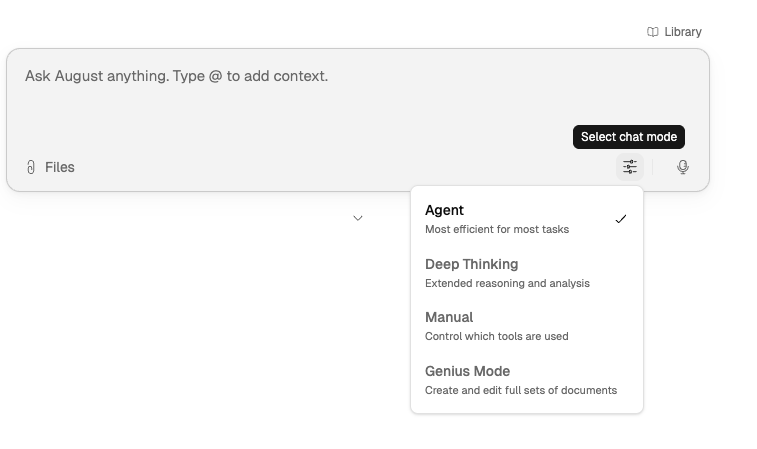
Agent · Genius · Deep Thinking · Manual. Match the mode to your task's speed and depth requirements.
Ask in English
Type or dictate your question. Press Enter to submit, or Shift+Enter for a new line.
Verify
Click any citation to jump to the source. Traceable claims let you validate before you rely.
Refine
Follow up with additional questions. Adjust scope, tighten language, and iterate until you have what you need.
Chat Behavior
When you're working in Assistant, the chat interface is designed to stay stable as you type and submit questions:
Composer expansion: As your input grows longer, the composer expands without pushing earlier messages out of view. The conversation stays anchored where you were reading.
Initial positioning: When you open an existing conversation, August positions the most recent question at the top of the viewport so you can pick up where you left off.
Tool approval pauses: When Assistant needs to run certain tools—such as web search or specialized agents—it may pause mid-run and show an approval card. You can allow or deny the tool call before the conversation continues. See Tool Approval in Assistant Chat for details.
Adding Context: Documents, Folders, and Artifacts
Use the Files button
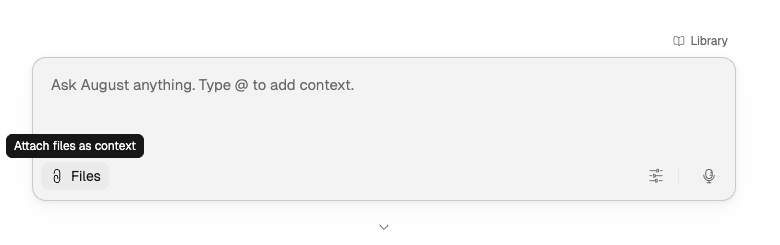
in Assistant to:
Upload documents needed for the task.
Attach entire folders when document sets need to be analyzed together.
Reference existing artifacts (playbooks or tabular reviews) from chat context.
Use @mentions and search to pull in specific items quickly. Keeping the right materials in context improves output quality and consistency.
This video demonstrates folder creation and upload.
Writing Effective Prompts
Use this formula: Task + Context + Format.
Task: What you want August to do (summarize, review, draft, compare, identify).
Context: Background details—document type, jurisdiction, deal stage, audience.
Format: How you want output structured (bullet points, table, memo).
Example: "Summarize this agreement and provide the key commercial risks in bullet points."
Prompt Tips
Be specific: Tell August exactly what you need.
Provide context: Mention document type, jurisdiction, or deal stage.
Ask for structure: Request bullet points, tables, or numbered lists.
Break complex requests: Ask one focused question at a time.
Use follow-ups: Refine or drill down into initial responses.
Operating Modes
Assistant offers multiple modes optimized for different needs:
Mode | Speed | Best For |
|---|---|---|
Agent (default) | Fast | Daily tasks, drafting, research |
Genius | Slow | Multi-step assembly, formatted outputs |
Deep Thinking | Moderate | Complex reasoning with visible chain-of-analysis |
Manual | User-controlled | Precise control over Create/Research/Analyze |
For detailed mode guidance, see Choosing the Right Mode and Genius Mode Overview.
Creating Outputs from Chat
Assistant can create structured work product directly from conversation:
Agent drafts: Describe a repeatable task and August proposes an agent draft card. Review the proposed steps, edit as needed, and press Save to create the agent. See Creating Agents from Assistant for details.
Draft outputs: First-pass memos, summaries, or document drafts built from matter context. Provide precedent language, core facts, and audience constraints for stronger drafts. Export when ready and continue revisions in Word.
Playbooks: Upload precedent agreements and ask August to extract standards. The resulting playbook captures preferred positions, fallback language, and red flags for reuse.
Tabular Reviews: Describe the extraction objective in natural language. August sets up rows and columns from chat context—useful for first-pass diligence and multi-document analysis.
Review generated structures before reusing broadly. Refine fields, scope, and naming to match your team's standards.
Iteration Workflows
Work in short, scoped passes rather than trying to complete everything in one prompt:
Start with orientation: "What are the key issues in this document?"
Validate citations and source support.
Refine with targeted follow-ups: clarify reasoning, tighten language, adjust scope.
Share outputs only after validation and context checks.
This pattern preserves quality under time pressure.
Legal Research
Research capabilities are accessed through Assistant and can be toggled by jurisdiction and practice area. Research is integrated alongside analysis and drafting in the same chat workflow.
Use AI for orientation, issue framing, and comparisons across authorities. Treat AI as first pass—verify the underlying authority before relying on conclusions.
India Legal Research Routing
For organizations based in India, August automatically routes ambiguous legal, regulatory, and case-law queries to Indian legal sources. This includes Lexis Indian commentaries, Supreme Court of India judgments, and official Indian regulatory databases.
For details on when India routing applies and how to override it, see India Legal Research Routing.
Why Citations Matter
Assistant workflows are built around source-grounded output. Inline citations help you trace an answer back to the document support behind it.
Before you rely on a conclusion, open the cited material and confirm that the answer matches the source. For more on validation, read How August Handles Sources and Citations.
When to Stay in Assistant vs. Move On
Stay in Assistant when the task is conversational or iterative. Move to another feature when the work needs a more specialized format:
Use Tabular Review for multi-document tables and repeatable extraction.
Use Playbooks when you want review to reflect firm standards.
Use Creating Agents from Assistant to turn repeatable tasks into reusable agents.
Use Agents for managing and running saved agents.
Related Resources
Tool Approval in Assistant Chat — how approval cards work when tools pause mid-run
Prompting Guide for August by Mode — detailed prompting patterns for each mode
Matter Intelligence: How to Use — cross-document synthesis for complex matters
How August Handles Sources and Citations — validation workflow