

Getting Started with August
Use this guide to get oriented quickly and start useful work in August. It covers access, navigation, and core workflows in one place.
Accessing August
From the web
Open your browser and navigate to app.august.law.
Sign in using your firm email and credentials.
Bookmark the page for quick access.
Adding as a Word Add-in (one-time setup)
In Word, go to Insert, then Get Add-ins.
Search for August.
Click Add to install.
Open August from the ribbon icon and sign in.
For detailed system requirements, see Word Add-In Overview.
This video walks through adding the August Word Add-in to Microsoft Word.
Projects and Navigation
August is organized around projects. You start with a default Personal project, then create additional projects as needed to separate matters. For details on managing projects and the sidebar, see Manage Your Sidebar Projects.
Within a project, the main sidebar areas are:
This video demonstrates how to create projects.
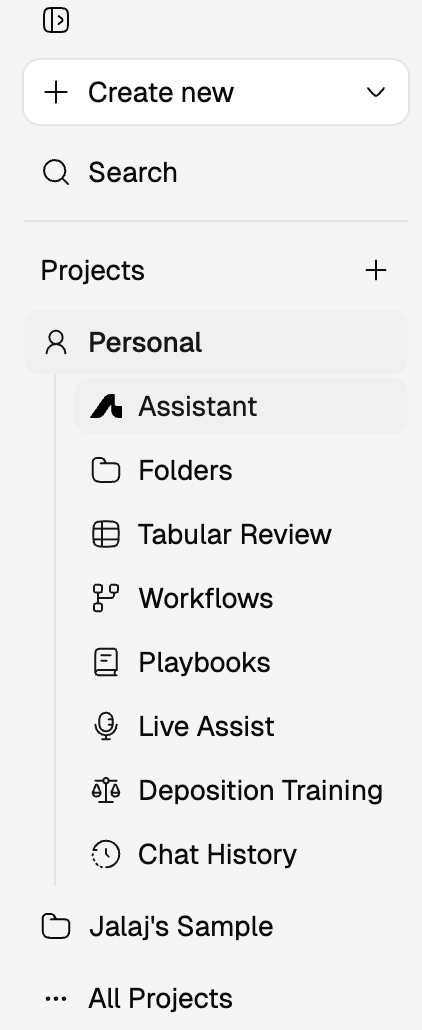
Assistant: Ask questions about documents, folders, or the web. Get answers with citations.
Folders: Organize source documents by matter, document type, or review phase.
Tabular Review: Turn large document sets into structured comparison tables with cited answers.
Agents: Automate repeatable legal tasks and run them on demand or on a schedule.
Playbooks: Capture your team's preferred positions, fallbacks, and flags for consistent review.
Live Assist: Transcribe legal conversations in real time and cross-reference statements against uploaded documents.
Chat history: Reopen earlier conversations and continue work without starting over.
For detailed navigation and document organization, see Document Management Overview.
Start in Assistant
Assistant is the main starting point for most legal tasks. The basic workflow:
Open Assistant in the correct project.
Upload or attach relevant materials using the Files button
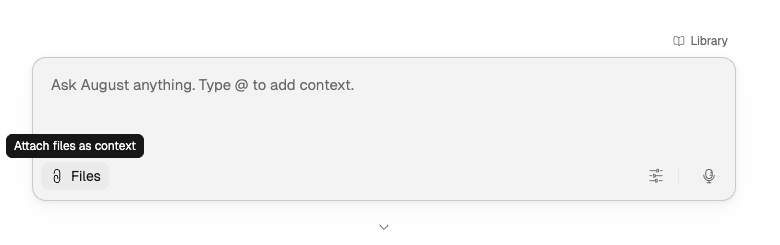
or @mentions.
Ask for one clear outcome: a summary, issue spot, comparison, or first draft.
Review the cited support before you accept the answer.
Refine with follow-up instructions rather than starting over.
This video shows how to query in Assistant.
For detailed workflows, modes, and prompting guidance, see Assistant Overview.
Uploading Documents
Upload files through Folders for repeat use, or directly in Assistant for one-off tasks:
Click Folders in the sidebar.
Click Create folder, name it for your client or matter.
Drag and drop files, or click Upload file to add documents.
Attach an entire folder to a chat or use it as source for a Tabular Review.
This video shows how to upload and move folders between projects.
For file formats and organization best practices, see Document Management Overview.
Writing Good Prompts
Use this formula: Task + Context + Format.
Example: "Summarize this agreement and identify key obligations in bullet points."
For detailed prompting patterns and mode-specific guidance, see Prompting Guide for August by Mode.
Verify Outputs
August is designed for source-grounded legal work. Every output includes citations that trace back to underlying documents. Always validate before you share client-facing or partner-facing work.
For how citations work and how to validate outputs, see How August Handles Sources and Citations.
When to Move Beyond Assistant
Stay in Assistant for conversational or iterative tasks. Move to another feature when the work needs a specialized format:
Tabular Review for multi-document tables and repeatable extraction
Playbooks to apply firm standards consistently
Agents for recurring tasks you want to automate
Live Assist for real-time transcription and cross-referencing
What to Read Next
Assistant Overview for the main workspace and query flow
Prompting Guide for August by Mode for detailed prompting patterns
Document Management Overview for projects, folders, and uploads
Security and Privacy to understand how August protects your data
August Academy for video tutorials and practical lessons