

Choosing the Right Mode
August's Assistant offers multiple operating modes, each optimized for a different point on the speed-versus-depth curve. Select the mode that matches your task's priorities.
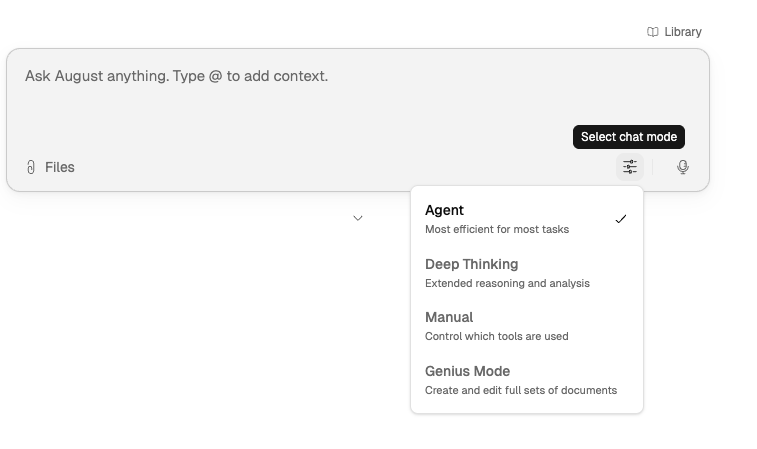
Mode Comparison
Each mode positions differently on speed and depth. Choose based on whether you need fast results, visible reasoning, or precise control.
Mode | Speed | Depth | Best For |
|---|---|---|---|
Agent (default) | Fast | Multi-step reasoning + tool use | Daily tasks, drafting, research |
Genius | Slow | Pattern recognition & intuition | Fluent, high-level output where polish matters |
Deep Thinking | Moderate | Methodical, step-by-step reasoning | Problems that benefit from visible chain-of-analysis |
Manual | User-controlled | User-directed intent control | Toggle Create / Research / Analyze for precise output direction |
Agent Mode
Agent is the default for most work. It balances speed with multi-step reasoning and tool use, making it suitable for day-to-day tasks like drafting, research, and document analysis.
Use Agent when you need a fast, capable response and don't require visibility into the reasoning process.
Agent mode uses Claude Opus 4.8 as the default model, with high reasoning effort for planning, tool execution, and response generation. You can configure your preferred models in Settings.
Genius Mode
Genius Mode is slow and thoughtful, designed for multi-step assembly and polished, high-level output. It relies on pattern recognition and intuition to produce cohesive, well-structured results without exposing its internal reasoning.
Use Genius Mode when:
You're producing formatted outputs in Excel, PowerPoint, Word, or PDF
You need multi-step assembly across multiple documents
Polish, voice, and document-ready quality matter more than speed
You're creating agents from conversation (agent creation uses Genius Mode)
For detailed guidance, see Genius Mode Overview. For agent creation, see Creating Agents from Assistant.
Deep Thinking
Deep Thinking works more slowly and methodically. It explicitly breaks problems into steps, tests assumptions, and surfaces its chain of analysis before giving conclusions.
Use Deep Thinking when:
You need to see the reasoning, not just the result
The problem benefits from visible chain-of-analysis
You're working through dense legal analysis or hard reasoning tasks
Manual Mode
Manual gives you tighter control over how the Assistant behaves during the task. Toggle between Create, Research, and Analyze to direct the output precisely.
Use Manual when you already know the exact workflow you want to drive step by step and need precise intent control.
How to Choose
Start with Agent for most day-to-day work.
Switch to Genius for multi-step assembly work across multiple documents.
Move to Deep Thinking for denser analysis or harder reasoning tasks where you want to see the reasoning chain.
Use Manual when you want to guide each step more directly with precise intent control.
No matter which mode you use, validate the output against cited source material before relying on it. Every output traces back to its source documents through citations.
What to Read Next
Assistant Overview for the main workspace.
Genius Mode Overview for detailed guidance on multi-step workflows.
How August Handles Sources and Citations for validation guidance.