

Playbooks Overview
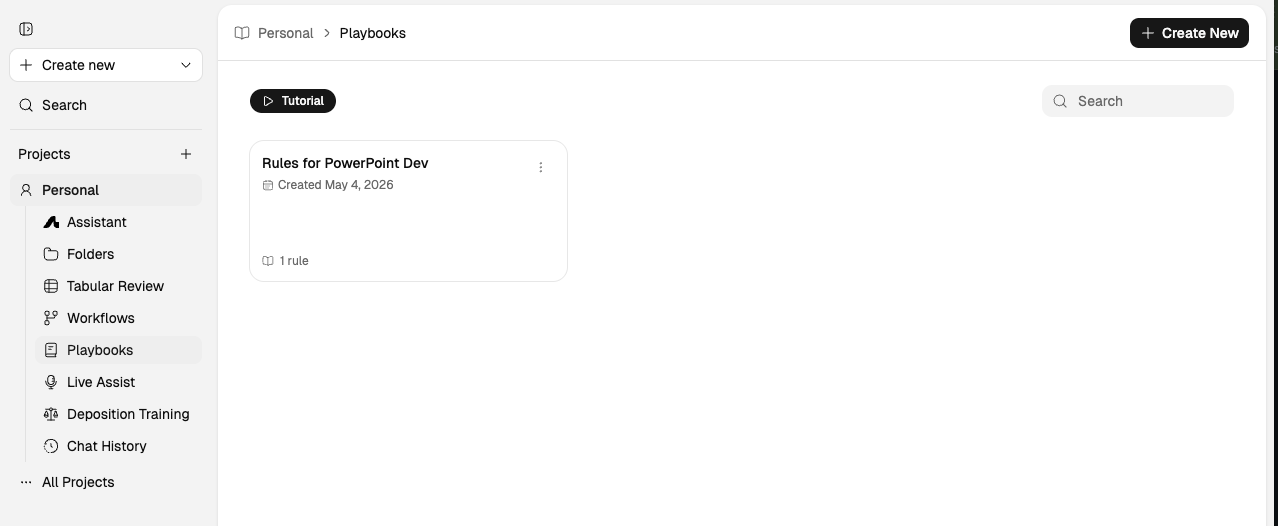
Playbooks convert firm standards and precedent into operational review rules. Define your preferred positions, fallback language, and red flags once—then apply them across every agreement in a document set. This standardizes how your team triages and discusses contract risk without losing deal-specific judgment.
This video shows how to create and configure Playbooks for your firm.
Core Components
Each playbook rule captures three elements:
Preferred position: Your firm's target language or risk posture for a given clause.
Fallback language: Acceptable alternatives when preferred terms are unavailable.
Flags: Terms or patterns that require legal attention or escalation.
Together, these elements structure consistent first-pass review. Escalate flagged items for attorney judgment where needed.
Creating Effective Rules
Start with representative precedent: Pull from prior deals, templates, and exemplar agreements.
Define what's acceptable: Identify what is acceptable, what is fallback, and what should be escalated.
Make rules testable: Keep rule language specific enough to be evaluated in review.
Review before publishing: Validate generated rules before rolling out to broader teams.
Update as positions evolve: Keep rules current as firm positions change.
Creating a Playbook
There are two ways to create a Playbook. Use AI generation for speed; use manual creation for precise control.
Method A: Generate via AI
Open Assistant
Start a new conversation in Assistant.
Attach reference docs
Upload precedent agreements, templates, or prior negotiated deals that reflect your firm's standards.
Ask to draft playbook
Describe the goal: "Extract our standard NDA positions into a playbook." August proposes preferred positions, fallbacks, and flags.
Review and save
Review generated rules, refine, and save. Generated playbooks can be reused for consistent review workflows across matters.
Method B: Build Manually
Playbooks → New
Navigate to Playbooks in the sidebar and create a new playbook.
Add rules · 5 parts
For each clause type, fill in: (1) starting position, (2) fallbacks, (3) unacceptable language, (4) example language, (5) guidance notes.
Review with team
Validate rules before publishing to broader teams. Update as firm positions evolve.
Save and deploy
Save the playbook. Apply it in Assistant, the Word Add-In, or embed in a Workflow.
Playbooks can be applied in three places: attached in Assistant, attached in the Word Add-In, or embedded as a step in an automated Workflow.
Applying Playbooks in Review
Apply playbooks to recurring agreements to check alignment with firm standards:
Select the playbook and the document set to review.
August evaluates each document against your defined positions.
Results show where terms match preferred language, where fallback applies, and what needs escalation.
Focus legal judgment on flagged items rather than re-reading every clause.
This supports faster first-pass review across high-volume document sets. Playbooks help standardize how teams triage and discuss contract risk. Final decisions remain with legal reviewers.
Using Playbooks with the Word Add-In
Playbooks can be applied directly in the Microsoft Word Add-in:
Open your document in Word.
In the August sidebar, select the playbook to apply.
August reviews the document against your standards and proposes edits.
Accept, reject, or modify each suggestion.
This supports in-document review against firm standards without leaving drafting context. Validate suggested changes before acceptance.
Apply mode: Playbook suggestions in Word respect your apply-mode setting. When Redline mode is selected, suggestions are applied as tracked changes. When Direct mode is selected, suggestions are applied as plain text replacements. See the Word Add-In documentation for details on switching between modes.
Best Practices
Start with your strongest precedents: Use well-negotiated agreements as the foundation.
Keep rules specific: Vague rules produce vague results. "Liability cap should not exceed 12 months of fees" is better than "limit liability."
Separate concerns: Create separate playbooks for NDAs, MSAs, settlement agreements, and other document types.
Iterate based on use: Refine rules as you discover edge cases in live reviews.
Version your playbooks: Keep track of changes so you can trace which version was applied to which matter.
When to Use Playbooks
Use playbooks when:
You're reviewing large productions with recurring document types
You manage a portfolio of similar agreements requiring consistent treatment
You want to standardize how junior attorneys approach first-pass review
You need to apply firm-wide positions across multiple deals simultaneously
What to Read Next
Assistant Overview to generate playbooks from precedent
Word Add-In to apply playbooks in documents
Tabular Review for structured comparison across document sets